MacBook Air On the Road; ModBook Gets Probed

Traveling this week with the MacBook Air. A few things of note: air2.jpg

  1. On a five hour flight from Las Vegas to Anchorage, the battery was still chugging along at 25% (wi-fi disabled) when the flight attendant told me to put it away because we were landing.
  2. Some early reports suggested that a high-speed USB internet adapter would not fit in the Air’s unique flip down USB port. However, the Sierra Wireless AirCard 595U slides in no problem.

    aircard.jpg

  3. Some shock and dismay when attempting to lock the Air down with a Kensington cable as the Air has no Kensington lock receptacle!
  4. On the plus side: the Air actually fits inside my hotel’s in-room safe (unlike the 15″ MacBook Pro replaced by the Air).

In other news: PC Mag reviewed the ModBook and gave it a paltry 3 out of 5 recommendation. For a rig that costs $2,600+ it really should do much better than 3 out of 5. PC Mag found the ModBook fell short by having terrible handwriting recognition, no rotation of the display (you are stuck with portrait mode); including a GPS antenna instead of WWAN (yeah, that’s just bone headed); lack of keyboard; and, heavy for a slate (5+ versus Motion Tablet’s 3.3 pounds). So, guess that makes the Air the better choice at this point even though it has neither built-in WWAN or GPS. 

TrialManager – Online Litigation Manager

trialmanager.jpg


Recently, MacLitigator had the opportunity to review a new online service called TrialManager. Nextpoint, the maker of TrialManager, claims that TrialManager is:

the fastest and easiest way to manage your evidence. A completely new way to use technology in the practice of law, TrialManager brings the simplicity and power of search engine functionality to your case. Remarkably easy to use, all you need is internet access and a browser to get started.

The Good. 

TrialManager offers a good deal of features, including instant OCR of all documents uploaded to the site. TrialManager really can be a one-stop litigation shop, one where anyone who can do a Google search can instantly be up to speed and searching through an entire case file. TrialManager is cheap, very cheap. Anything less than 500 pages is free… pretty amazing. Even from there on up, the cost remains reasonable, with plans ranging from $29/month for up to 2,500 pages all the way up to $299/month for 100,000+ pages.

Once you get the documents into TrialManager, there are some very useful tagging, labeling, issue coding and search abilities. One very unique feature is a trial presentation mode which allows on-the-fly callouts and context sensitive mouse highlighting.  For instance, if you call out a particular portion of a document, it blows it up and magnifies it. The mouse then changes to a highlighting tool to automatically highlight particular passages of the callout.  

The Bad.

Calendaring and Contacts: TrialManager offers an online calendar. However, the calendar does not provide, nor does the main program itself, any kind of RSS feed. Further, there is no standardized (such as iCal) output for the calendar. Additionally, there is no integration with Address Book or other ‘localized’ content. 

Document Management: Uploading of documents must be done ‘by kind.’ I.E. you can batch upload PDFs, TIFFs, or ASCII files, but each document type must be uploaded separately. Documents once uploaded, can only be tagged/labeled on a per document basis, not a per page basis. Of course, labeling a 500 page document does nothing to advance case analysis. Despite the extensive labeling/tagging, there is no ability to timeline any events.  

Depositions, at present, may only be in text format. There is no ability to handle video depositions.

The product is not any type of ‘e-discovery’ manager or tool. 

The Ugly ASP.

ASP stands for “Application Service Provider.”  Typically, it means the convenience of a system which is entirely in the cloud. No messy software to download and maintain, no upgrade headaches, no hardware. In essence, your local computer/laptop becomes a ‘dumb’ terminal and gateway to the online application. Recently, The Mac Lawyer profiled one such ASP Rocket Matters with a favorable review.  In contrast to the esteemed Mac man himself, Ben Stevens, let me sum up any ASP that has no offline storage/synchronization: it sucks, it’s poison, it’s a disaster waiting to happen, especially if your data is stored in some incomprehensible format which is not readily downloadable and transferable to another platform.

Here is a brief excerpt from a C|Net article detailing the implosion of Red Gorilla, a time & inventory ASP. In 2000:

Red Gorilla had abruptly ditched the application service provider (ASP) jungle in October, leaving its clients hanging. “Our billing cycle was coming to a close…I sent an email to (Red Gorilla) user support, and it bounced back,” said former Red Gorilla customer Pam LaFollette of Kinetic. “That’s when everyone got real pale.”

As attorneys, make that pale times two. First, the business end and chaos created by your litigation management software becoming ‘defunct.’ Second, explaining to the local bar how it is you let an entire case slip away because a third-party internet vendor disappeared.  

TrialManager relies on Amazon’s S3 storage, and is built on Ruby on Rails so security and ‘uptime’ should not be an issue with letting your data live in the cloud.  However, with TrialManager, there is no, none, nada offline availability other than to check off boxes and download single documents. Worse, there is no synchronization of changes made to downloaded documents while offline. So, while Amazon’s S3 service isn’t likely to go anwhere and, Ruby on Rails is a solid and speedy programming platform, there is no guarantee that TrialManager will be around tomorrow to give you the access you need.  When asked how Nextpoint can guarantee that TrialManager will always be available, CEO Rakesh Madhava said “We’re not going anywhere.” Call me a cynical lawyer, or call me to quick to rely on past horror stories such as Red Gorilla, but neither TrialManager nor RocketMatters cost and maintenance savings will help me sleep better when neither offers any sound offline access.

During the demo, the CEO of TrialManager attempted to demonstrate the ‘export’ feature of TrialManager… it failed. I did receive a follow-up email from TrialManager’s tech team which stated that the data and corresponding documents could be offloaded in formats (oll, dat, and xml) which Concordance, Summation or another piece of software can allegedly then use as a load file. My experience with transporting entire databases has been, at best, mediocre and at worst, many days of lost time and effort only to give up and recode everything from the start.  

If you can’t get online, you can’t use the system. So, if in a courtroom and you don’t have online access (or worse, you lose your connection during trial), you are stuck. No matter how slick the callout and highlight features are, and no matter how quickly you can call up a particular document, these features become useless unless you are online. As a litigator, I simply would never put a trial’s outcome or my practice’s continuing viability, at stake based on the often fickle internet connection.


Game On.

journlericon.jpg

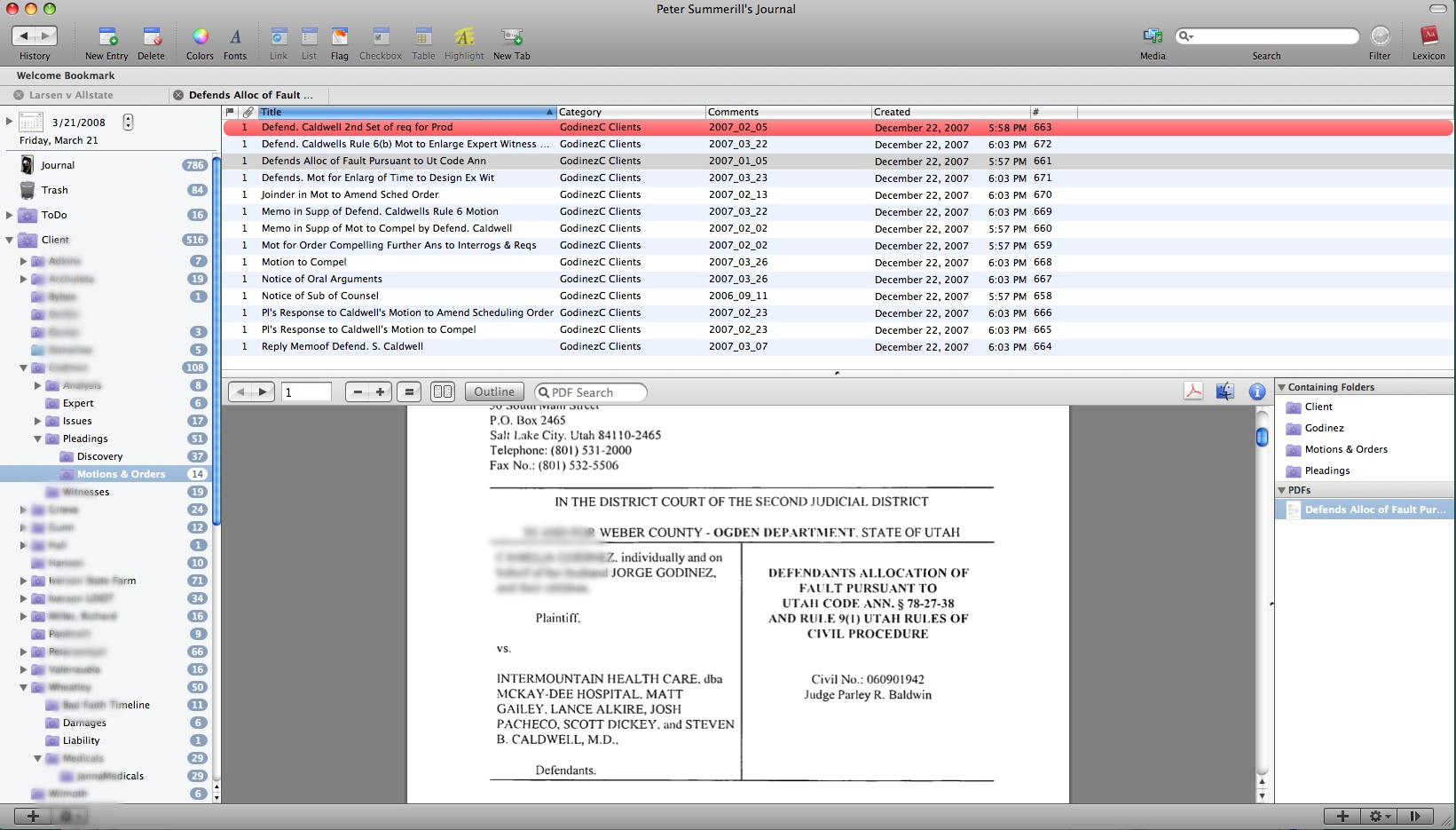
Journler 2.5.4 is out of beta and has gone live. This beautiful program includes tagging, categorization, smart folders etc etc etc. MacLitigator has been using this program for sometime and keep your eye here for the complete details on how to use Journler as a fantastic replacement for Casemap for you switchers. Journler’s tagging & smart folders enable you to keep a single piece of information linked to multiple topics while the Lexicon feature indexes all entries and shows relations among your data you didn’t know existed.  

journler.jpg 


Get Journler here, get it now. 

Rescue Me, Rescue Time?

rescuetime.jpg

Anybody, and I’m looking at myself the most critically, can find themselves getting sucked into the blackhole that is the internet, the WWW, the interwebs, the intertubes or whatever you want to call this giant time sink. It’s inevitable, and it’s why Google stock is worth so damn much. Humans follow their noses and those targeted links are the bullring in your nostril. Computers themselves, even devoid of the interwebs, offer tantalizing ways to waste your time… diddling around in iPhoto or finding an entire afternoon sacrificed at the altar of iTunes organizing and creating smart playlists. So, in steps a service/product called Rescue Time.

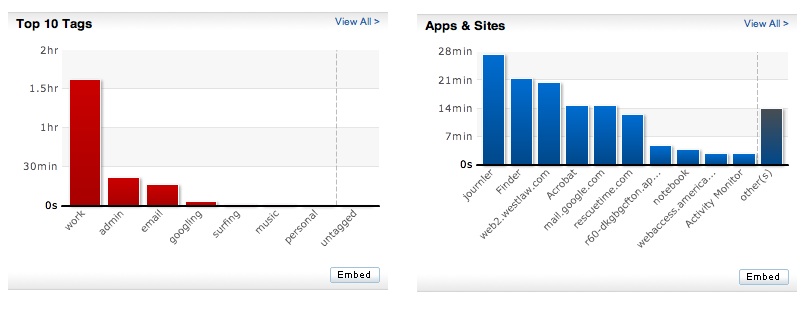
The product looks very promising… it doesn’t ‘block’ out websites or keep you from using certain software during designated hours.  Rather, it tracks every single application you use and every single website you spend time perusing. You can then go back and just look at what you didn’t accomplish and where you didn’t accomplish it. If sufficiently shocked and motivated to do something about the mess, you can tag these timesucks and start taking control over it all.timegraph.jpgIn the few short days in use here at MacLitigator, the results were astounding and will certainly alter workflow, focus and hopefully squash the incessant and heretofore unrealized need to repeatedly check email. Perhaps the best recommended method for using this software is to install and then forget about it for a few days. After 2-3 days, come back and you will see exactly where your weaknesses lie, and can then implement a plan to address those weaknesses. An added bonus for all you billable hour monkeys, you can go back and recreate information for timesheets.

Easy Envelopes, Really Easy.

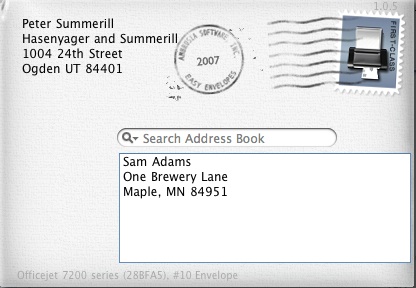
Ambrosia Software makes a free widget called Easy Envelopes. I use this widget so often, I take it for granted and… that’s just the kinda stuff this blog was made to pass along.

 envelope.jpg

Easy Envelops is a Mac OS X widget that allows you to print an envelope, with a predefined return address or no return address. You can look an address up using Address Book from inside the widget, or you can cut and paste from where ever. Also, the widget fully supports fonts, colors etc. for a professional appearance. Once done addressing, click the postage stamp and a print dialog comes up asking you to choose your printer etc. I use this little widget all the time.  Ambrosia Software also makes the pay software WireTap Studio, a great application for sound capture and editing as well as SnapzProX, a screen capture utility for capturing full motion video of anything on your screen, a.k.a. screencasting. 

Maximize A Minimized Window.

One of the frustrating things about switching was that doing the alt-tab thing didn’t work on Macs. First, you need to quit using the alt key and switch to the Command key (squiggle). Second, if the window you are tabbing over to is minimized to the dock, Command-Tab won’t maximize the window. All praise blog A New Mac Tip Every Day for digging through the hints at MacOSXHints. Here’s the cheese at the end of the maze:

1. Press Command-Tab until you are on the application you want to switch too.  

2. Without releasing Command, press on Option and then release Command.

3. The window should maximize from the Dock.

iPhone SDK Announced, Alphabet Soup Down 3 Letters

Today Apple (formally) announced the release of a Software Development Kit.  An SDK allows independent third party developers to create applications for the iPhone.  Applications will be distributed through iTunes and subject to Apple approval (Good: no crap malware sneaks through. Bad: you must Trust Apple’s discretion in allowing/disallowing applications onto iTunes).  In any case, this comes as really good news for me, someone too timid to jailbreak/hack their iPhone into third-party software submission. Also, for you Enterprise drones in the big firm or corporate world, Apple licensed ActiveSync to wash away all of your Microsoft Exchange woes and ease the minds of IT Staff everywhere.  Oh, yeah, and ActiveSync will allow push email, calendar and address book syncing… a.k.a. watch out Palm & RIM.  You can get all the gory details at either tuaw or Lifehacker.

Leap… A Beautiful Find(er).

As a switcher, I initially hated the Finder, then grew to accept the Finder, then, with Leopard’s Quick Look, loved the Finder. Leap, from the Ironic Software & makers of Yep, has stolen my heart away.

LeapIcon

In Finder, the new Leopard Quick Look and the Smart Folders kept me satisfied.  Two smart folders in the sidebar would give quick access to all documents created in the last 30 days, or, all PDF’s created in the last 30 days. These two smart folders allowed a quick glance to determine what new mail came in (all mail gets scanned at our office to PDF) and also what new documents had been generated by staff.  

Tag, Leap’s It. 

What was missing from the equation was the ability to ‘tag’ documents, and thereby associate a particular document with something other than the folder where it resided.  Leap fills this void and does so through a really nice OS X interface. By allowing tagging on the document, you can now do things like add a tag ‘ToDo’ and then filter every single file on your Mac to see what documents need review or attention.  Another approach would be to tag documents ‘WorkProduct,’ ‘Produced,’ ‘ToDone,’ ‘Expert,’ or just about any other tag you might find useful. Also, you can create ‘bookmarks,’ the same thing as smart folders, so that you could have rapid access to all files tagged ‘ToDo’ or ‘Expert.’ Leap incorporates Leopard’s Quick Look, an incredibly useful feature that, once used, you cannot do without.

Hansel & Gretel Stay On Path 

breadcrumb.jpg 

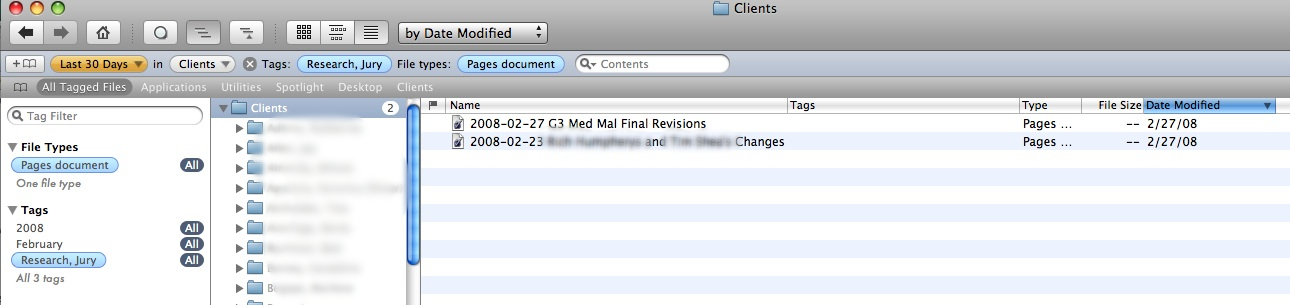
Along the top row a ‘breadcrumb’ trail tells you exactly how you arrived at the present list of documents, e.g. Last 30 Days> in Clients> File types: Pages. The bottom of the window displays the current path of the file over which the mouse is currently hovering. So, unlike Finder, you do not need to select the file to see the path.  

The only complaint so far is that (1) you cannot filter tags in the disjunctive or exclusive, i.e. WorkProduct OR Privileged/ WorkProduce BUT NOT Privileged; and, (2) Leap does not provide tabs.  For such a feature rich program, the inability to have multiple tabbed windows open hurts a bit. On the other hand, this is 1.o and bound to get better in the future.  You can see a video demo of Leap at the website, though it appears the interface shown is from the beta model of Leap as it differs slightly in the panes displayed by the application.  At $59.00, Leap runs on the high end of typical download software for the Mac, but that price seems well worth it based on the features provided.  Leap can be downloaded for a free trial period if you’re not convinced yet.